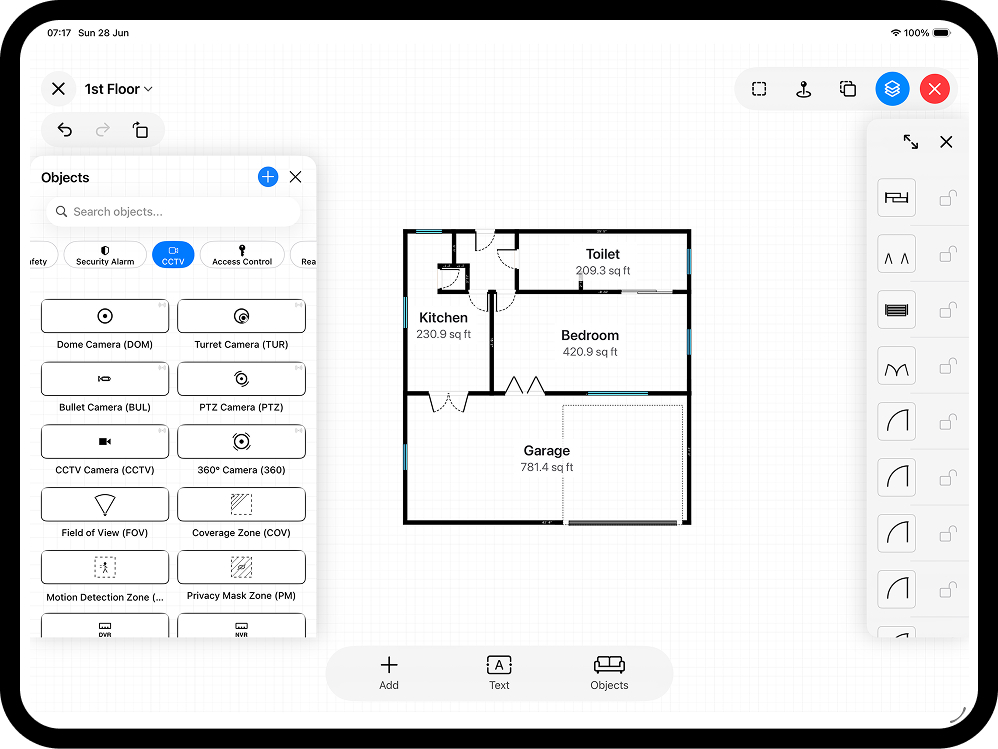
Metres or feet and inches? On a floor plan it is not a style choice - it is a communication contract with whoever reads the drawing. UK construction runs almost entirely metric, US residential work runs almost entirely imperial, and plenty of jobs sit awkwardly in between: a surveyor who wants square metres and a homeowner who thinks in feet. The good news is you do not have to pick once and live with it. RoomPlot works in metric or imperial throughout and switches the whole plan over in a tap - this guide explains when to use each, what the standards actually say, and how to switch without introducing errors.
One plan, both unit systems
RoomPlot stores the true geometry of your plan and simply formats it in whichever measurement system you choose. Set it to metric and lengths read in metres; set it to imperial and the same walls read in feet and inches. Nothing about the drawing changes - only the labels - so you can measure in the field in the units you think in and present in the units your client expects. That applies whether the plan came from a LiDAR AR scan or was drawn manually with smart snapping: the geometry is one source of truth, and metric or imperial is just how it is displayed.
What the standards say
If your plan feeds into anything formal, the unit choice is often made for you:
- UK construction drawings are metric. British Standard BS 8888 (which replaced BS 308) governs technical drawing conventions, and the industry convention since metrication is to dimension building drawings in millimetres, with metres used for larger site dimensions. An architect or building control officer will expect metric.
- UK floor areas are quoted in square metres. RICS measurement practice - the Code of Measuring Practice and the International Property Measurement Standards (IPMS) - defines Gross Internal Area (GIA), Net Internal Area (NIA) and the IPMS residential bases. When a portal listing shows a floor area, it is normally GIA, and areas with less than 1.5 m of headroom are excluded across these standards. RICS itself does not mandate a unit - it says to follow the accepted unit for the market - which in the UK means m².
- US residential drawings are imperial. The standard floor-plan scale is 1/4″ = 1′-0″ (roughly 1:48), dropping to 1/8″ = 1′-0″ for larger buildings, with lengths written as feet and inches and areas in square feet.
In short: match the drawing convention of the country and the audience, not your personal habit.
When to use metric
Across the UK, Europe and most of the world, building work runs in millimetres and metres. If your plan is going to a UK surveyor, an architect, a building control officer or a landlord's licensing file, metric is the expected language. Areas in square metres are what valuations, EPCs and agency particulars quote, and RoomPlot calculates room and floor areas for you automatically, so the m² figure on your export comes from the geometry rather than from mental arithmetic. Metric is also simply easier to total: adding 3.6 m + 2.85 m is one sum, with no twelfths involved.
When to use imperial
For US work, and for plenty of UK trades and homeowners who still think in feet and inches, imperial reads more naturally. Timber, kitchens and older UK housing stock were set out imperially, and many clients only have a feel for "a 12 by 10 bedroom". RoomPlot formats imperial lengths as feet and inches rather than awkward decimal feet, so a wall reads "12 ft 6 in", not "12.5 ft". Switch the whole plan to imperial and every dimension, the scale bar and the area summary follow.
Where mixed units go wrong
Most unit disasters are not exotic - they are the same three mistakes on repeat:
- Manual conversion. Converting 4.2 m to 13 ft 9 in by hand (and rounding twice along the way) is how a plan drifts. One wall converted at 3.28 ft/m and another at "about 3.3" no longer close a rectangle.
- Ambiguous labels. A dimension written "4.2" means metres to a UK reader and could mean anything to a US one. Always let the unit appear on the plan or in the title block.
- Area confusion. 1 m² is about 10.76 sq ft, so a 100 m² flat is roughly 1,076 sq ft - quote the wrong one and the property sounds ten times bigger or smaller. If you publish both, derive both from the same measurement, never from a converted-then-rounded figure.
The fix for all three is the same: keep one measured source of truth and let software do the formatting.
Switching without redrawing
Because the unit system in RoomPlot is a display setting, you never redraw to change it. A practical workflow:
- Survey in the units you are fastest in. Scan with LiDAR on a Pro iPhone or iPad, or draw manually - the captured geometry is unit-agnostic.
- Check dimensions on site while you can still re-measure. See how to measure a room for the fundamentals.
- Set the plan's unit system to match the reader - metric for a UK professional audience, imperial for a US client - and confirm the room area labels have followed.
- Export per audience. Need both? Export a metric PDF report for the surveyor, then flip to imperial and export a PNG or PDF for the client - same plan, two outputs, zero manual conversion. DXF export carries the true geometry into CAD, where the receiving office applies its own drawing units.
The snapping grid, dimensions and area figures all reformat automatically, so there is no conversion step to mistype and no second drawing to keep in sync.
Accurate either way
Units are a presentation choice; accuracy comes from the measurement underneath. Get that right and the metric or imperial label takes care of itself. For the fundamentals, see how to measure a room and how to scale a floor plan, or browse the full set of RoomPlot guides to take a plan from site visit to client-ready export.