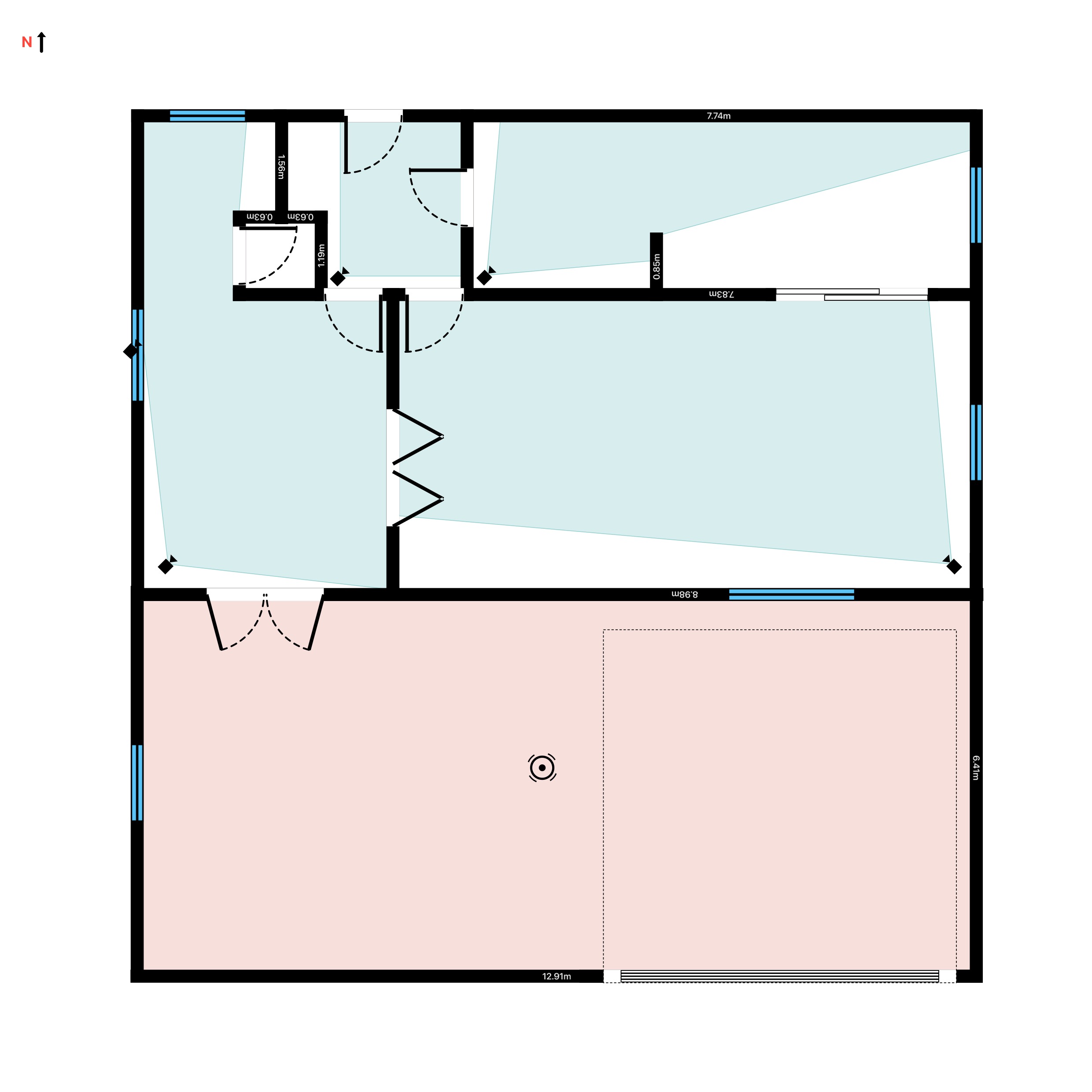
A blind spot is where an intruder knows your cameras cannot see. Finding and closing those gaps is the whole job of a good CCTV survey - and it is far easier to do on a plan, before you drill a single hole, than up a ladder afterwards. This guide shows how to spot the gaps a camera leaves and lay out a system that covers every corner.
What actually causes a blind spot
Most blind spots are not caused by cheap cameras. They are caused by geometry. A camera only sees what is inside its field of view (FOV) and range, and it cannot see through walls, around corners, or past a tall unit. The three usual culprits are:
- Corners and returns. An L-shaped room or a recessed doorway hides the area behind the corner from a camera looking down the main run.
- Too narrow a lens. A 25° ANPR lens is superb at a gate and useless for a whole forecourt. Match the FOV to the space.
- Mounting too low or facing the sun. A camera at head height is easily blocked and easily blinded; an east or west aspect washes out at dawn and dusk.
Map coverage on the plan, not up a ladder
RoomPlot draws the area each camera actually covers. Drop a dome, bullet, PTZ or 360 camera on the plan and it paints a wall-occluded FOV cone - a ray-fan that is cut off by walls, so the shadow behind a corner appears the moment you aim the camera. Coverage switches on automatically when you place a device and updates live as you rotate or move it, so you can see a blind spot open and close in real time. Every camera family has a sensible default cone (dome and turret 90° by 10 m, bullet 60° by 15 m, PTZ 360° by 20 m, a 360 camera 360° by 8 m), and you can tune the FOV from 10° to 360° and the range up to 40 m to match the exact lens you are quoting.
Six rules for gap-free coverage
- Start at the entry points. Every door, gate and ground-floor window is a priority before you cover open floor.
- Mount in corners. A camera in a corner sees two walls at once, so a single unit can cover most of a rectangular room.
- Overlap deliberately. Let one camera's cone begin where another's ends, so no single failure or obstruction leaves a hole - and each camera records the approach to the next.
- Mind the returns. Add a camera for every alcove, stair core or L-return the main run cannot see into.
- Match the lens to the distance. Wide for rooms, long and narrow for driveways and number plates.
- Avoid the sun and the reach. Keep cameras above 2.5 m and off a direct east or west aspect.
Tip. Turn on the editor's global Coverage toggle and rotate each camera until the shaded shadow behind every corner disappears. What you see on the plan is what the lens will see on site - a wall-occluded cone, not an optimistic circle.
Turn the survey into a client document
Once the plan is gap-free, export it. Coverage areas bake straight into the exported plan and into the multi-page Report PDF - the Fire/Security report preset forces the coverage overlay on and adds an auto-generated legend of every camera used, so the client sees exactly what each device watches. You can also send the geometry out as DXF that opens in any CAD package for the wider design team. It is a survey a customer can sign off with confidence, and no competitor computes wall-occluded coverage the way RoomPlot does.
For the underlying method, see our guide to a CCTV camera coverage plan, or browse every walkthrough in the guides library. When you are ready, open RoomPlot, drop your first camera, and watch the blind spots close.